

Studying abroad is different from packing for a one-week vacation. You are not just charging a phone in a hotel room. You may be living in a dorm or apartment for a semester, carrying a laptop to class every day, charging multiple devices overnight, taking weekend trips, and trying to decide whether to bring hair tools, a power strip, a toothbrush charger, a CPAP setup, a camera kit, or a small appliance from home.
That is why the safest power plan is not “buy a universal adapter and hope.” A plug adapter changes the shape of the plug. A GaN travel adapter combines plug-shape coverage with USB-C/USB-A charging for wide-voltage electronics. A voltage converter changes voltage for certain compatible devices. A local cord or local appliance may be the smarter answer for long-term living. Those are different tools.
Start with the device label. If a charger says 100-240V, it is designed to accept common worldwide outlet voltages. Apple says its USB power adapters are designed for 100V AC to 240V AC at 50Hz to 60Hz, and Dell tells travelers to check the input range on the AC adapter before using it abroad. If a device says 120V only, a plug adapter alone can make it fit a 230V outlet while still sending the wrong voltage into the device.
Build Your Study-Abroad Power Kit in Layers
A good semester-abroad setup has layers. Each layer solves a different moment in the trip: the flight, the first week, the dorm desk, the bathroom, and short trips away from campus. This structure keeps you from overbuying a voltage converter when you only need USB-C charging, and it keeps you from underbuying when one 120V-only device truly needs a stricter plan.
Flight bag
Phone, laptop, USB-C cable, headphones, power bank, and essential chargers. Power banks stay in carry-on bags.
Arrival week
One reliable adapter or GaN adapter so you can charge immediately before buying local accessories.
Dorm desk
A stable multi-device charging setup for laptop, phone, tablet, camera, and class accessories.
Bathroom
Hair tools, shaver bases, toothbrush chargers, and grooming devices checked one by one.
Weekend trips
Small adapter coverage for the countries you may visit during the semester.
The University of Illinois Education Abroad packing list includes electronics such as a cell phone, chargers, laptop, outlet adapters, and USB cables, while also cautioning students about items such as hair dryers, curling irons, straighteners, and large electronics. That split is exactly right: most study-abroad electronics are charging problems, while many appliances are voltage, wattage, or local-purchase problems.
Use this rule: pack power for the devices that keep you connected and able to study, then be skeptical about anything that makes heat. Phones, tablets, laptops, camera batteries, and headphones often belong in the adapter or GaN bucket. Hair dryers, kettles, coffee makers, heated styling tools, and U.S. surge strips deserve a slower check.
Step One: Read the INPUT Label
The fastest way to avoid buying the wrong item is to find the line that starts with INPUT, I/P, or AC Input. Do not start with the plug shape, the product title, or the word “universal.” Start with the voltage range the device accepts from the wall.

If the INPUT line says 100-240V and 50/60Hz, the power supply usually accepts common worldwide outlet voltages. You still need the right plug shape.
For a laptop, check the power brick or USB-C charger, not only the laptop body. For a toothbrush, check the charging base, not only the handle. For a camera, check the battery charger. For a CPAP machine, check the exact power supply that will travel with the machine. If a charger uses a detachable AC cord, the brick may be worldwide while the cord only solves plug shape.
| Label or device detail | What it usually means | Study-abroad decision | Avoid this mistake |
|---|---|---|---|
| INPUT: 100-240V, 50/60Hz | Wide-voltage power supply | Use the correct plug adapter or GaN travel adapter | Do not buy a voltage converter for that charger alone |
| INPUT: 120V, 60Hz | U.S.-style single-voltage input | Converter-check in 220-240V countries | A shape adapter does not make it safe |
| Dual voltage 120/240 switch | May support both voltage ranges | Set the switch correctly before plugging in | Do not leave the switch on 120V in Europe |
| No readable INPUT | Unknown compatibility | Find the exact model manual or leave it home | Do not guess from size or brand |
| OUTPUT: 20V / 5V / 24V | Low-voltage power sent to the device | Useful for charging specs, not wall compatibility | Output does not tell you if the charger accepts 230V |
The destination still matters. A U.S. student going to the UK, Ireland, continental Europe, Australia, Singapore, India, or many other 220-240V destinations should be especially careful with anything labeled 120V only. A student going to Japan may face a different kind of question because Japan is closer to U.S. voltage but has regional frequency differences. Brazil and a few other destinations can have mixed local voltage. Use DOACE's country plug and voltage guide after you check your device label.
Student Device-to-Route Matrix
A semester suitcase is not one electrical problem. Each device gets its own route. The phone charger may be adapter-only, the laptop may need a higher-output USB-C charger, the toothbrush base may need a converter check, and the hair dryer may be better bought locally.
| Device | What to check | Usual route | DOACE path | Do not do this |
|---|---|---|---|---|
| Phone, tablet, earbuds | Charger INPUT and USB-C output | Adapter or GaN travel adapter | 70W GaN for light kits; 100W if sharing with a laptop | Do not buy a converter for a 100-240V charger |
| Laptop | Power brick INPUT and required USB-C wattage | Adapter, local cord, or 100W/140W GaN when compatible | 100W or 140W GaN for heavier USB-C needs | Do not assume a 35W phone charger can replace a laptop charger |
| Camera or drone charger | Original charger INPUT; third-party charger differences | Adapter-only if wide-voltage | GaN if USB-C compatible and wattage fits | Do not judge from the camera body alone |
| Electric toothbrush or shaver | Charging base label | Adapter-only or converter-check | Small-device converter route only if needed and compatible | Do not assume low wattage means universal voltage |
| CPAP or medical device | Exact power supply, humidifier, backup power, manual | Often adapter-only if PSU is 100-240V; stricter backup check | LC-X35 only if conversion and cleaner waveform are truly needed | Do not improvise for overnight medical equipment |
| Curling iron or straightener | Dual-voltage label, switch, wattage, controls | Adapter-only if dual-voltage; converter-check or local tool if single-voltage | LC-C30/LC-X35/C15 only under strict fit conditions | Do not treat smart or high-watt tools as simple loads |
| Hair dryer | Voltage, wattage, tool design, manual | Usually local dryer, hotel dryer, or compatible high-watt route | C15 or LC-X80 only for compatible traditional loads | Do not plug a 120V dryer into 230V through a shape adapter |
| Kettle, rice cooker, coffee maker | High wattage, dorm rules, long heat cycle | Usually buy locally or use provided appliances | Local purchase is often cleaner than conversion | Do not pack a U.S. kitchen appliance just because a converter exists |
| U.S. power strip or surge protector | Voltage rating and surge design | Usually avoid; buy local compliant strip if allowed | Use GaN multi-port charging instead of a U.S. surge strip | Do not connect a 125V surge strip to 230V through an adapter |
Figure 1: Most study-abroad electronics are adapter or GaN charging problems. Converter decisions belong to specific single-voltage devices, not the entire trip.
Flight Bag: Power Banks Must Stay With You
A study-abroad flight can be long: home airport, international leg, layover, train or bus transfer, temporary housing, and maybe a first night before you can buy local accessories. A power bank is useful, but it has its own rule set.
The FAA treats power banks and portable chargers as spare lithium batteries, and TSA lists power banks as carry-on items rather than checked-bag items. In practical terms, pack your power bank in your personal item or carry-on, not in checked luggage. Check the Wh rating printed on the power bank before flying. Small common phone power banks are usually below 100Wh, while larger battery stations may cross into airline-approval territory or be unsuitable for passenger travel.
Dorm Desk Reality: Do Not Recreate a U.S. Power Strip Abroad
A dorm desk looks simple until you start counting devices: laptop, phone, tablet, earbuds, watch, lamp, camera battery, maybe a second monitor, maybe a game handheld. The temptation is to pack a familiar U.S. surge protector power strip and run everything through one travel adapter. That is often the wrong instinct.
A U.S. power strip does not convert voltage. Many U.S. surge strips are rated for 125V and should not be connected to 220-240V outlets through a plug adapter. Dorm rules may also limit extension cords or high-load appliances. For a semester abroad, a better path is to make the student desk mostly USB-C and wide-voltage: one reliable GaN adapter or charger, original laptop charger as backup, destination-compatible local cords where appropriate, and local power accessories bought after you know the room and rules.
This is also where a GaN adapter makes more sense than a converter for many students. If the devices are wide-voltage electronics, the daily problem is charging organization: enough USB-C wattage, enough ports, and a plug that fits the wall. A voltage converter is not needed for those wide-voltage chargers.
Bathroom Devices and Hair Tools Need the Strictest Check
Hair tools are where many students get bad advice. A dual-voltage straightener or curling iron can often travel with a plug adapter if the label says 100-240V, or if it has a properly set 120/240 switch. A 120V-only tool going to a 230V country is a different case. You must check wattage, controls, and the manual before considering a converter.
High-watt hair dryers, smart hair tools, tools with digital displays, sensors, automatic shutoff systems, or complex motor designs should not be treated as simple resistive loads. Even a high-watt converter does not override a manufacturer warning or make every tool compatible. For many students, the better answer is to use a dorm-provided dryer, hotel dryer, dual-voltage travel tool, or locally purchased appliance.
Electric toothbrushes and shavers look harmless, but their charging bases vary. Some are 100-240V; others are 120V-only. Check the base label before you leave. If the base is 120V-only, decide whether it is worth a converter route or whether a USB travel version, local charger, or longer battery cycle solves the problem more cleanly.
Medical and Overnight Equipment
If the student uses CPAP or another medical device, do not rely on general packing advice. Check the exact power supply, the manufacturer's manual, the heated humidifier or accessory wattage, and any battery plan. Many modern CPAP power supplies are wide-voltage, which means the normal route may be the correct plug adapter plus a backup plan, not a voltage converter. If conversion is actually required and the device is sensitive, pure sine wave output may be worth evaluating, but only after the manufacturer guidance and wattage checks are clear.
When Pure Sine Wave Matters
Pure sine wave is not the first question for most students. It matters only after you already know that a device actually needs voltage conversion. A smooth pure sine output is closer to normal wall power than a modified wave or stepped wave, which can be relevant for some sensitive devices, motors, audio equipment, or overnight medical setups. It does not remove the need to check wattage, runtime, device type, and manufacturer instructions.

Pure sine output is a cleaner waveform path for certain compatible sensitive devices. It is not a shortcut around voltage, wattage, or manufacturer limits.
Figure 2: Pure sine wave is a sensitivity decision after conversion is already required, not the default route for wide-voltage student electronics.
DOACE Product Routing for Study Abroad
Use the product route only after the label route is clear. For most students, the first product category is a GaN travel adapter for wide-voltage electronics. A converter is for a specific 120V-only device, not a general upgrade over an adapter.

DOACE 70W GaN Travel Adapter
Best fit: phone, tablet, earbuds, camera charger, and many light USB-C laptop setups where the device charger or power supply is marked 100-240V.
Not for: 120V-only hair dryers, kettles, coffee makers, or other appliances that need AC voltage conversion.

DOACE 100W GaN International Adapter
Best fit: one USB-C laptop plus phone, tablet, camera batteries, or headphones from a single wall outlet in a dorm room or library.
Not for: single-voltage appliances. The 100W rating is USB-C charging output, not a promise to step 230V down to 120V.
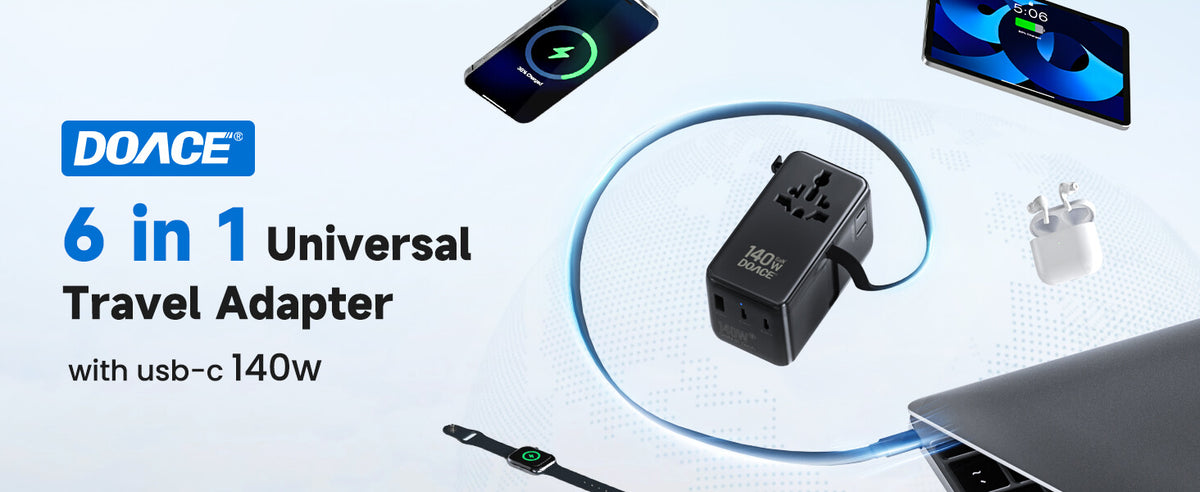
DOACE 140W GaN Travel Adapter
Best fit: high-output USB-C laptop users, design or engineering students, creators, and students who charge a laptop plus other devices at the same desk.
Not for: high-watt 120V appliances. More USB-C output does not turn a GaN adapter into a voltage converter.

DOACE LC-C30 Voltage Converter Route
Best fit: compatible low-to-mid power 120V-only devices after you confirm wattage, device type, runtime, and manual permission.
Not for: high-watt hair dryers, Dyson-style tools, unknown labels, dorm kitchen appliances, or any device whose manual warns against converters.

DOACE LC-X35 Pure Sine Wave Converter
Best fit: sensitive or longer-running compatible 120V-only devices when conversion is truly needed and the manual allows it.
Not for: devices that are already 100-240V, high-watt appliances outside its rating, or any medical device setup you have not checked with the manufacturer.

DOACE C15 or LC-X80 High-Watt Route
Best fit: compatible traditional higher-watt loads only after label, wattage, manual, and destination checks.
Not for: turning a dorm room into a U.S. appliance zone. For kettles, coffee makers, and many hair dryers, local purchase is often safer and simpler.
When to Buy Locally Instead
For long stays, local purchase is not a failure. It is often the best electrical decision. A local hair dryer, kettle, desk lamp, rice cooker, or extension accessory is built for the local voltage and plug style. It also avoids the weight and uncertainty of carrying a U.S. appliance plus a converter across an ocean.
Buy locally or use housing-provided appliances when the device is high wattage, runs hot, runs for a long time, has digital controls, has no readable label, or is easy to replace at the destination. Save your packing space for the power items that are hard to replace immediately: laptop charger, phone charger, USB-C cables, medically necessary equipment, and a compact adapter that lets you function on arrival.
Common Mistakes Students Make
| Mistake | Why it happens | Better answer |
|---|---|---|
| Buying a “universal adapter” and assuming it converts voltage | The word universal sounds like it solves everything | Treat it as plug shape and charging convenience unless the product explicitly provides voltage conversion |
| Packing a U.S. surge protector power strip | It feels normal for dorm life in the U.S. | Check voltage rating and housing rules; usually buy local power accessories instead |
| Using one answer for the whole suitcase | The laptop charger works, so the hair tool feels safe | Check every device label separately |
| Putting a power bank in checked luggage | It gets packed with other electronics at the last minute | Keep power banks and spare lithium batteries in carry-on bags |
| Choosing the biggest converter first | Bigger wattage feels safer | Check device type, manual, runtime, waveform, and local alternatives before buying |
| Ignoring plug differences during weekend travel | The student focuses only on the host country | Check the countries you may visit, especially UK vs continental Europe, Switzerland, Italy, Denmark, and South Africa-style exceptions |
How Many Adapters Should a Student Pack?
For most semester-abroad students, one primary GaN travel adapter plus one small backup plug adapter is a practical starting point. The primary adapter lives at the dorm desk or in the backpack. The backup stays in the suitcase, travel pouch, or emergency kit. If the student has a medically necessary device, bring the manufacturer-recommended power supply and a separate backup route for that device rather than depending on the same adapter used for a phone.
For Europe, do not assume one plug shape covers every country and every outlet. Continental Europe commonly uses Type C, E, or F; the UK and Ireland use Type G; Italy can involve Type L; Switzerland uses Type J; Denmark has its own grounding considerations. For Asia, Australia, South America, and Africa, the mix can change again. Use the world plug types A to O cheat sheet when the semester includes weekend trips.
The 7-Day Pre-Departure Power Check
Do the power check one week before departure, not the night before. The night before a semester abroad is when people discover that a toothbrush base is 120V only, the laptop charger is missing, the power bank has no visible Wh rating, and the “universal adapter” bought online does not have enough USB-C output for a laptop. A week gives you time to replace a charger, buy a second cable, print a manual, or decide to buy a hair tool locally.
Make one table on paper or in a notes app. Put every item in one row: phone charger, laptop charger, tablet charger, camera battery charger, electric toothbrush base, shaver base, hair tool, CPAP supply, power bank, and any appliance you are tempted to bring. For each item, write the exact INPUT label, the destination country, the plug type, and the route. The route should be one of these: adapter or GaN, converter-check, local cord, buy locally, or do not bring.
This exercise often makes the final packing list smaller. Students discover that the phone, laptop, tablet, and camera chargers all say 100-240V. That means the main purchase can be one good GaN travel adapter and a backup plug adapter. Then the only remaining hard decisions are the edge cases: a 120V-only grooming base, a single-voltage hair tool, a U.S. power strip, or a medical device setup.
| Pre-departure question | Fast answer if the label passes | Slow down if | Best next action |
|---|---|---|---|
| Can my laptop charge abroad? | INPUT says 100-240V and charger output meets laptop needs | The adapter is missing, third-party, or output is too low | Bring original charger or a compatible high-output USB-C option |
| Can I charge everything from one wall outlet? | Devices are USB-C or use wide-voltage chargers | You plan to add a U.S. surge strip or unknown extension cord | Use a multi-port GaN route, then buy local room accessories if needed |
| Can I bring my hair tool? | It is clearly dual-voltage and the switch is set correctly | It says 120V only, has smart controls, or lacks a manual | Buy local, bring dual-voltage, or do a strict converter check |
| Can I bring a power bank? | Wh rating is visible and within ordinary passenger limits | The capacity is huge, unlabeled, damaged, or packed in checked luggage | Carry it on and confirm airline rules for larger batteries |
The First 48 Hours After Arrival
The first two days abroad are where a simple kit matters more than a perfect kit. You need to contact family, open maps, receive university messages, check into housing, and probably use a laptop before your local shopping routine is settled. Keep your main adapter, one USB-C cable, one phone cable, and your laptop charger in the carry-on or personal item, not buried in checked luggage.
Once you see the dorm room, make decisions locally. Are the outlets far from the desk? Are there only two accessible outlets? Does the room use a recessed socket that blocks bulky adapters? Does the housing office have rules about extension cords, heaters, kettles, or cooking devices? A local store can often solve the room-specific problem better than a U.S. accessory packed before you saw the room.
For the first 48 hours, the most reliable setup is often simple: one GaN adapter for phone, tablet, and laptop charging; the original laptop charger as a backup; one small backup plug adapter; and no high-watt appliances. Once the student is settled, add local room accessories that match the country, voltage, and housing rules.
Weekend Travel During the Semester
Study abroad often includes side trips. A student based in Paris may visit London, Rome, Zurich, Barcelona, and Amsterdam. A student based in Singapore may visit Malaysia, Thailand, Indonesia, and Japan. A student based in South Africa may run into Type M, Type N, and regional outlet differences. A single-country adapter plan can fall apart when the semester becomes multi-country.
The cleanest weekend kit is small: passport, phone, power bank in carry-on, USB-C cable, one compact GaN travel adapter, and any country-specific plug support needed for the route. If all weekend devices are wide-voltage electronics, you still do not need a voltage converter. You need plug coverage and enough charging output. If the weekend bag includes a hair tool or medical device, that device gets its own label and manual check again.
Be especially careful with UK versus continental Europe. A Type C or Type E/F adapter for France, Germany, Spain, or the Netherlands does not fit UK Type G outlets. Italy, Switzerland, and Denmark can also create plug-fit or grounding surprises. The voltage may be broadly similar across much of Europe, but plug shape and grounding details can still change. That is why a world plug reference is useful even after you understand voltage.
Three Example Packing Setups
The right setup depends on the student, not just the destination. Here are three realistic examples that show how the same rules produce different kits.
Example 1: Liberal arts student in Spain
The student carries an iPhone, AirPods, iPad, MacBook Air, Kindle, and a camera battery charger. Every charger says 100-240V. The correct route is a Type C/E/F-capable adapter or GaN travel adapter, plus enough USB-C output to keep the laptop and phone charged. A 70W or 100W GaN option can be enough depending on the MacBook and whether the student charges multiple devices at once. No voltage converter is needed for those chargers.
Example 2: Engineering student in the UK with a heavy laptop
This student has a high-output USB-C laptop, phone, tablet, headphones, calculator charger, and camera gear. The UK plug shape is Type G, and the laptop may charge slowly on small USB-C bricks. The better route is a higher-output GaN adapter, possibly 100W or 140W, plus the original laptop charger as backup. The decision is output wattage and plug coverage, not voltage conversion, as long as the charger INPUT says 100-240V.
Example 3: Student bringing hair tools and a toothbrush base
This student has the same electronics as Example 1, but also a 120V-only curling iron and a toothbrush charging base with a 120V label. The phone and laptop still use the GaN route. The curling iron and toothbrush base are separate decisions. The curling iron needs a dual-voltage replacement, local purchase, or converter-check based on wattage and manual. The toothbrush base may be cheap enough to replace with a local charger or a travel version. One good answer for the laptop does not solve the bathroom devices.
Why You Should Not Buy the Converter First
A voltage converter sounds like the safe, all-purpose purchase because it feels more technical than a plug adapter. For study abroad, that instinct often creates a heavier, more expensive, and still incomplete kit. The converter may not be needed for the student's main electronics. It may not be suitable for the one appliance the student actually wants to bring. It may add weight without solving plug placement, USB-C output, airline battery rules, dorm restrictions, or local weekend travel.
Buy in this order instead. First, confirm which devices are wide-voltage. Those devices move into the adapter or GaN route. Second, decide how much USB-C output the student needs for daily school life. A phone-and-tablet kit is different from a high-output laptop kit. Third, isolate the single-voltage devices and ask whether they are worth saving. A small shaver base may be easy to replace. A favorite styling tool may be worth a stricter check. A coffee maker or kettle is usually better bought locally. Fourth, consider a converter only for a remaining device with a clear label, a compatible load type, acceptable wattage, and manufacturer guidance that does not prohibit conversion.
This order protects both safety and budget. It stops a student with only wide-voltage electronics from buying conversion hardware they will not use. It also stops a student with a high-risk appliance from assuming that any converter with a large wattage number is enough. A good power plan narrows the problem before it spends money.
It also makes shopping easier for parents. Instead of asking “which converter should we buy,” ask “which device still has an unsolved power problem after the wide-voltage electronics are removed from the list?” Most of the time, the answer is one or two questionable appliances, not the laptop, phone, tablet, and camera kit.
What a Long-Term Dorm Charging Station Should Look Like
For a semester abroad, the charging station should be boring in the best way: a stable wall connection, a charger that matches the devices, enough cables, and no mystery loads. Put the laptop and phone charging location somewhere the student uses every day. Keep a second cable in the backpack. Keep the backup plug adapter in the suitcase or desk drawer. Label the charger or pouch so it does not get mixed with a roommate's adapters.
If the laptop power brick uses a detachable AC cord and the brick says 100-240V, a local cord may be cleaner for the dorm desk than stacking a bulky adapter every day. If the student relies on one USB-C GaN adapter for everything, keep the original laptop charger available as a backup. If the dorm has only one convenient outlet, do not automatically solve that with a U.S. power strip. A local, properly rated accessory bought after arrival may be safer and may fit the room better.
Think in daily routines. At night, the phone, watch, earbuds, and laptop may all need charging. Before class, the laptop must be ready. On travel weekends, the kit must shrink to one adapter and a power bank. During exams, backup power matters more than neat packing. A long-term setup should support those routines without asking a student to remember complicated voltage rules every time they plug something in.
What to Do When the Label Is Missing or Hard to Read
If a label is scratched, tiny, or hidden, use the exact model number. Search the manufacturer's manual, not only marketplace descriptions. Marketplace listings can mix versions, colors, regions, or old product text. If the student has a replacement charger, check the replacement charger itself. A replacement power supply can have different input ratings from the original one.
If you still cannot confirm the INPUT rating, do not bring the device as an essential item. Unknown-label devices are poor candidates for international power experiments. This is especially true for anything that heats, runs a motor, charges overnight, supports medical use, or would be expensive to replace. The safest answer is often to leave it home, buy locally, or replace it with a clearly labeled wide-voltage travel version.
Parents' Pre-Departure Checklist
Parents often want to solve the whole power problem before departure, but the best help is a checklist, not a pile of adapters. Sit down with every device that will actually travel. Read the INPUT line. Photograph the label. Write the destination country and likely weekend countries. Separate the gear into four buckets: wide-voltage electronics, single-voltage devices, power banks, and items to buy locally.
| Before departure | What to verify | Why it matters |
|---|---|---|
| Every charger | INPUT voltage and frequency | Prevents adapter/converter confusion |
| Laptop setup | Original charger, USB-C wattage, backup cable | Schoolwork depends on reliable charging |
| Power bank | Wh rating and carry-on packing | FAA/TSA rules affect where it can go |
| Hair tools | Dual-voltage label, switch, wattage, manual | High-risk category for damage and bad purchases |
| Power strip idea | Voltage rating and housing rules | U.S. surge strips are often the wrong item abroad |
| Local purchase list | Hair dryer, kettle, lamp, extension accessories | Often safer and easier after arrival |
Frequently Asked Questions
Do I need a voltage converter for my laptop when studying abroad?
Usually no, if the laptop power adapter says INPUT: 100-240V, 50/60Hz. Many modern laptop chargers are wide-voltage. You may still need the correct plug adapter, a local AC cord, or a higher-output USB-C GaN adapter if you want a smaller multi-device charging setup.
Is a universal travel adapter the same as a voltage converter?
No. A universal travel adapter usually changes plug shape and may add USB charging ports. It does not automatically step 230V down to 120V. If a product provides voltage conversion, it should clearly say so and list converter ratings and limits.
Can I bring a U.S. power strip to a dorm abroad?
Do not pack a U.S. power strip unless you have confirmed its voltage rating, design, and housing rules. Many U.S. surge protectors are not appropriate for 220-240V outlets through a travel adapter. For a semester abroad, a local compliant strip or a GaN multi-port charging setup is usually cleaner.
Can I bring a power bank on the plane?
Yes, but it belongs in carry-on baggage, not checked luggage. Check the Wh rating before travel. Standard phone power banks are often below 100Wh, while larger batteries may need airline approval or may not be allowed.
Should I bring my hair dryer or straightener?
Only bring it if the exact tool is dual-voltage or you have completed a strict converter check. Many students are better off using a local or provided hair dryer and bringing only a confirmed dual-voltage styling tool. High-watt, smart, or unknown-label tools are poor candidates for guessing.
How many adapters should I pack?
For most students, one main GaN travel adapter plus one backup plug adapter is enough. Add more only if the student has separate fixed charging locations, medical equipment, or a multi-country route that needs different plug types.
What if my study-abroad country uses more than one plug type?
Check both plug shape and voltage by country and by the cities or countries the student may visit. Plug shape decides whether it fits. Voltage decides whether the device can safely accept the electricity. Use the country guide for destination planning, then return to the device label.
What should I buy before departure?
Buy the essentials you need immediately on arrival: a reliable adapter or GaN adapter, USB-C cables, and a backup charging plan for important devices. Delay local appliances and room power accessories until you know the dorm rules, plug type, and room layout.
Final Packing Rule
If the device says 100-240V, solve plug shape and charging convenience. If it says 120V only, slow down and check wattage, load type, runtime, and the manual. If it makes heat, draws high power, has smart controls, or is easy to buy locally, do not force it into the suitcase. The best study-abroad power setup is the one that keeps school essentials charged without turning every appliance into a converter problem.


