

Quick answer: iPhone 18 Pro and iPhone 18 Pro Max still use USB-C, so the port itself does not force travelers to buy a new kind of plug adapter. The practical change is speed: Apple now lists its fastest wired result as up to 50% charge in around 15 minutes when you use a 60W-capable adapter or higher with Adjustable Voltage Supply and a USB-C charging cable. Abroad, that means you need the right plug shape and a suitable USB-C power source, not a voltage converter for the phone.
What Changed With iPhone 18 Pro Charging?
The easy headline is that iPhone 18 Pro charges faster. The more useful travel answer is narrower: the connector remains USB-C, but Apple’s fastest charging condition is more specific. On the U.S. iPhone 18 Pro technical specifications, Apple lists USB-C for charging, DisplayPort, and USB 3 data, and it lists fast charging up to 50% in around 15 minutes with a 60W-capable adapter or higher with Adjustable Voltage Supply, paired with a USB-C charging cable.
That does not mean every old charger is useless. A 20W, 30W, or 35W USB-C charger may still charge the phone. It simply may not reach the fastest wired condition Apple describes. For someone upgrading from an older iPhone, the real question is not “Can I charge it?” The question is “Do I care about the fastest short top-up, or do I mostly charge overnight?”
Apple also lists wireless charging up to 25W for both MagSafe and Qi2 on the U.S. specs page. With a 35W adapter or higher and a MagSafe Charger, Apple lists up to 50% charge in 30 minutes. That is useful at a hotel desk or nightstand, but it is not the same as the fastest wired path.
The 60W AVS Detail Matters More Than The Port
A lot of buying mistakes start when people look only at wattage. Apple’s wording has three pieces: 60W-capable or higher, Adjustable Voltage Supply, and USB-C charging cable. USB-IF describes USB Power Delivery as a flexible power system where devices and power sources negotiate what is needed. In newer high-power USB PD, adjustable voltage supply lets the device request intermediate voltages rather than relying only on fixed steps.
For travel, that means a charger can be “big enough” in wattage but still not be the exact accessory Apple used for the fastest published result. Apple’s own 40W Dynamic Power Adapter with 60W Max is positioned around that 60W max output and AVS requirement. A third-party charger should be judged by its actual USB-C PD and AVS support, not only by the number printed on the front.
Practical rule: if you want normal reliable travel charging, choose enough USB-C power and the right destination plug. If you want Apple’s fastest 15-minute result, check for the full 60W-capable + AVS + USB-C cable condition.
Do You Need A Voltage Converter Abroad?
For iPhone 18 Pro itself, no. The phone is charged through USB-C low-voltage output. The part that faces wall power is the charger or travel adapter. If that charger is marked for wide input, such as Input: 100-240V, 50/60Hz, it is designed for the voltage range used in most countries. In that case, the travel problem is plug shape and charging convenience.

Figure 1: A wide-voltage input label is the simplest way to tell whether a charger is meant for international wall voltage.
This is where the adapter-versus-converter distinction matters. A travel adapter changes the plug interface and may add USB-C charging ports. A voltage converter changes voltage, such as stepping 220-240V down for certain 120V-only appliances. Your iPhone charging setup normally belongs in the adapter-only category. A U.S. hair dryer, curling iron, kettle, or other 120V-only appliance may not.
Before a trip, look at every device that will share the same wall outlet. Your iPhone may be easy. The risk often comes from another item in the suitcase. If a label says 120V only, do not plug it into a 230V country through a USB-C travel adapter. Start with the device power label guide or the adapter vs converter guide.
What To Pack For iPhone 18 Pro Travel
| Traveler setup | What matters | Good direction |
|---|---|---|
| iPhone 18 Pro only | Small size, one good USB-C cable, destination plug | Compact USB-C travel adapter |
| iPhone + Apple Watch + AirPods | Multiple small devices overnight | 70W class GaN travel adapter |
| iPhone + iPad + laptop | Shared USB-C wattage and fewer charger bricks | 100W class GaN travel adapter |
| iPhone + MacBook Pro + camera kit | Higher USB-C headroom and heavier daily use | 140W class GaN travel adapter |
| iPhone + 120V-only appliance | Voltage conversion and appliance risk | Separate converter decision, not a GaN adapter |
If you only carry the phone, you probably do not need the biggest charger in the bag. If your phone travels with a laptop, the laptop becomes the sizing driver. If your phone travels with a 120V-only appliance, the appliance becomes the safety driver. This order keeps the purchase grounded in the actual device mix.
Where DOACE 70W, 100W, And 140W Fit
DOACE GaN travel adapters make the most sense when your devices are wide-voltage electronics and USB-C devices. They help with destination plug coverage, fewer charger bricks, and multi-device charging. They should not be described as voltage converters.

DOACE 70W GaN 3.0 Travel Adapter
Best fit: iPhone 18 Pro, tablet, earbuds, watch, camera battery, and light daily travel.
Not for: 120V-only appliances, voltage conversion, guaranteed Apple 15-minute maximum charging, or grounding needs that the product does not document.

DOACE 100W GaN International Power Adapter
Best fit: iPhone 18 Pro plus iPad or one USB-C laptop, especially when hotel outlets are limited.
Not for: two high-power laptops at once, single-voltage appliances, or assuming every port stays at maximum output when several devices are connected.
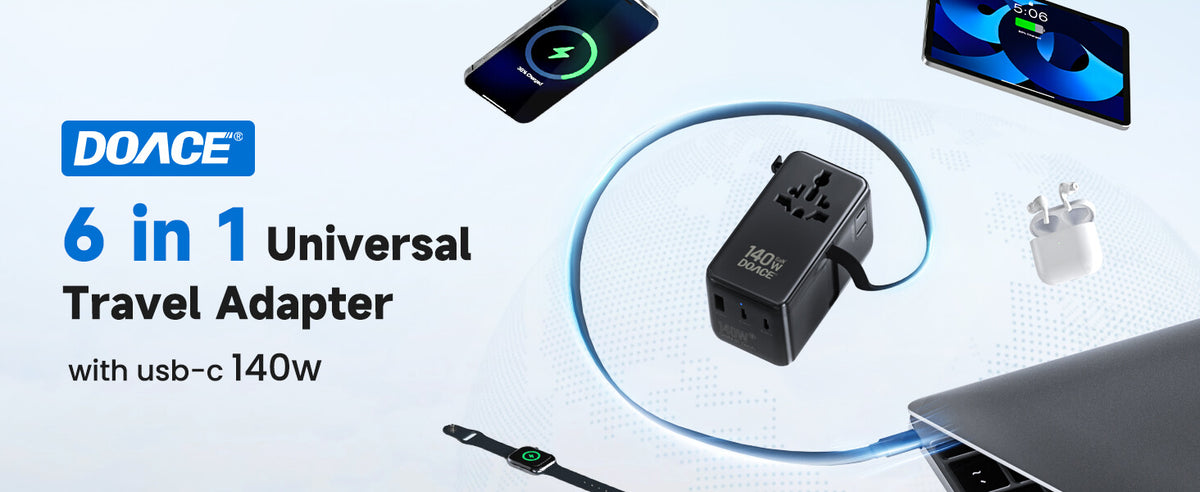
DOACE 140W GaN 3.0 Travel Adapter
Best fit: heavier Apple travel kits, such as iPhone 18 Pro with MacBook Pro, camera gear, or remote-work devices.
Not for: phone-only trips where the extra headroom adds little value, or any device that needs AC voltage step-down.
Fast Charging Paths Compared
The chart below turns the charging decision into a packing decision. It does not try to promise exact charging times for every accessory. It separates Apple’s fastest published condition from the broader travel-adapter jobs of plug coverage, multi-device charging, and laptop headroom.
Figure 2: Match the charging path to the trip, not just to the highest wattage number.
MagSafe And Qi2 Are Still Worth Packing Carefully
MagSafe and Qi2 are convenient because they remove cable fuss at the desk or bedside. On U.S. Apple specs, both are listed up to 25W for iPhone 18 Pro. That makes a magnetic charger useful for overnight charging, map planning, video calls, or a hotel-room desk. It is less ideal when you have twelve minutes before boarding and need the fastest possible top-up.
A second travel detail is adapter stacking. A magnetic charger still needs a power adapter, and that power adapter still needs the right wall plug. If you are traveling through the UK, continental Europe, Australia, and the U.S. on one trip, a multi-country travel adapter can reduce the number of plug pieces you carry. If you only visit one country, a simple country plug may be enough.
When Your Old Charger Is Still Fine
Keep an older USB-C charger if you mostly charge overnight, if the label says 100-240V, and if you do not care about the fastest Apple-published wired result. A slower charger can still be a good backup in a suitcase. The mistake is not using an older charger. The mistake is expecting every older charger and every USB-C cable to behave like Apple’s newest fast-charge setup.
Cables matter too. A worn, charge-only, low-quality, or unknown USB-C cable can become the weak link. For a new iPhone 18 Pro travel kit, pack at least one dependable USB-C cable that matches the charging level you want, plus one shorter backup cable for a power bank or bedside charger.
When To Leave The Adapter Path
Leave the GaN adapter path when the item is not a phone, tablet, laptop, camera charger, or other wide-voltage electronic device. A 120V-only appliance in a 230V country is not solved by a USB-C travel adapter. That includes many U.S. hair tools, small kitchen appliances, and older specialty chargers. If the device label is unclear, do not guess from the plug shape.
DOACE has separate converter products for compatible single-voltage devices, but even a converter is not a universal permission slip. Wattage, startup load, heat, usage time, waveform sensitivity, and manufacturer limits still matter. For iPhone 18 Pro travel, the cleanest advice is simple: keep the phone and laptop on the adapter/USB-C path, and evaluate appliances separately.
A Simple Packing Checklist
- Check the charger label for Input: 100-240V.
- Choose the destination plug coverage before choosing wattage.
- Use a 60W-capable AVS setup if Apple’s fastest wired result matters to you.
- Choose 70W for light iPhone travel, 100W for iPhone plus laptop, and 140W for heavier Apple work kits.
- Do not plug 120V-only appliances into a 220-240V outlet through a travel adapter.
Phone-Only Travel: Keep It Small
If the iPhone 18 Pro is the only serious device in your bag, the best setup is usually simple: one dependable USB-C cable, one compact travel adapter for the destination, and maybe one backup cable in a separate pocket. A larger 100W or 140W adapter can still work, but the phone will not become a laptop just because the charger has laptop-level headroom.
This is where a 70W class GaN travel adapter can be a practical fit. It gives plenty of room for a phone, earbuds, watch, and small tablet without turning a short city trip into a full remote-work kit. For a weekend in Paris, Tokyo, Seoul, or Mexico City, the useful feature may be plug coverage and an attached USB-C cable, not the largest wattage number in the product line.
The exception is a traveler who wants one adapter to cover future trips too. If you are buying once for both phone-only weekends and laptop trips later in the year, 100W may be a cleaner long-term choice. The key is to buy for the heaviest realistic trip, not for a number that looks impressive on its own.
Business Travel: Size For The Laptop First
For business travel, iPhone 18 Pro is often not the main power draw. The laptop is. A phone may need a fast top-up before a ride, but the laptop is the device that can turn a hotel desk into a cable problem. If you carry a MacBook Air, an iPad, AirPods, and iPhone 18 Pro, a 100W class travel adapter is often the more balanced center.
A 100W setup lets one adapter take the role that several small chargers used to play. It also makes international travel easier because the wall plug system is built into the adapter. Instead of carrying a U.S. laptop brick, a phone charger, a plug adapter, and a spare USB-A cube, the traveler can carry one main charging hub plus a backup cable. That is the real gain: fewer pieces to lose under a hotel desk.
There is one catch: simultaneous charging changes the experience. When several ports are used at the same time, many chargers split available power across devices. That is normal. If the laptop must remain the priority, connect it to the strongest USB-C output and let the phone charge from another port or later in the evening. The phone can recover quickly; a laptop under load needs steadier headroom.
Creator And Remote-Work Kits Need More Headroom
A creator kit is different from a phone kit. It may include iPhone 18 Pro, MacBook Pro, camera batteries, a drone charger, SSDs, headphones, and a second screen or hub. In that environment, 140W is not about making the iPhone charge at 140W. It is about keeping the larger USB-C devices from fighting for the same limited power budget.
The DOACE 140W GaN adapter fits this heavier use case better than it fits a phone-only trip. Its value is higher USB-C headroom and fewer packed chargers, especially when the laptop is used for editing, uploads, meetings, or navigation planning after a full day outside. If the trip includes work deadlines, camera dumps, and a phone that must be ready for maps and mobile data, the extra headroom has a clear job.
Still, the same Apple fast-charge caution applies. Higher wattage is not the entire Apple condition. If the exact 15-minute Apple result matters, check the charger’s AVS support and use a suitable USB-C cable. If the trip goal is a strong all-around Apple charging hub, 140W is easy to justify. If the trip goal is only iPhone charging, it is more than most people need.
Airport Charging Is A Short-Top-Up Problem
Airport charging is not the same as hotel charging. In an airport, you may have ten to twenty minutes near an outlet, a crowded seating area, and a boarding call getting close. This is when wired USB-C matters most. A magnetic charger is comfortable at a desk, but a direct USB-C cable is usually the better short-top-up tool.
For iPhone 18 Pro, this is also when the Apple 60W AVS condition becomes relevant. If you bought the new phone partly for faster charging, build the airport kit around a known-capable power source and a cable you trust. If you only have an older 20W charger, it can still help, but do not expect the same quick recovery Apple describes for the newest fast-charge setup.
Keep the cable accessible. Many travelers pack the good cable in the suitcase and keep a weaker cable in the backpack. That small packing choice can erase the benefit of buying a better adapter. A simple rule works well: one main USB-C cable stays with the adapter, one backup cable stays in the day bag, and any power bank cable stays with the power bank.
Hotel Charging Is A Multi-Device Problem
Hotel charging is slower and more forgiving, but it involves more devices. By the time you return to the room, the phone may be low from maps and photos, the watch may be almost empty, earbuds may need a case refill, and the laptop may need to recover for the next morning. A single wall outlet near the bed can become the bottleneck.
This is why a travel adapter should be judged by the whole night, not just by the phone’s fastest ten minutes. A 70W setup can be enough for phone plus small devices. A 100W setup is better when a laptop joins the mix. A 140W setup makes sense when the laptop is heavy, the day is work-heavy, or two larger USB-C devices need attention before morning.
Do not forget the physical plug. Europe, the UK, Australia, and the U.S. do not use the same outlet shape. A charger that works electrically can still be useless if it cannot physically connect to the wall. That is the part a travel adapter solves. It gives your wide-voltage charger or built-in USB-C charging system a way to meet the local outlet.
Airbnb And Older Buildings Add Outlet Uncertainty
Airbnb stays and older hotels can be less predictable than new business hotels. Outlets may be behind furniture, far from the bed, shared with lamps, or placed in a kitchen instead of a desk area. Some outlets may feel loose or may not support bulky adapters comfortably. A compact adapter, short cable, and backup charging plan can matter more than a high wattage label.
If the outlet is physically awkward, avoid building a heavy stack of adapters and chargers that hangs from the wall. Use the travel adapter directly when it fits well, or choose a safer outlet position. Do not force a loose connection. Fast charging is useful only when the physical connection is stable enough for normal use.
This is also where the built-in cable style can help. A built-in or retractable USB-C cable reduces the chance that the one cable you need is missing at bedtime. It does not change the voltage-conversion boundary, but it can make the everyday travel setup easier to manage.
Family Travel: Label The Adapter Role
Family travel turns one adapter into shared infrastructure. One person may buy an iPhone 18 Pro, but the charging pile can include several phones, two tablets, earbuds, watches, a camera, and a laptop. In that case, 100W or 140W may be more useful than it first appears because the adapter is no longer serving one device.
Shared charging also creates shared risk. Someone may see an open AC outlet on a travel adapter and plug in a 120V-only appliance without checking the label. That is how an adapter intended for phone charging becomes a voltage mistake. If several people use the same adapter, make the rule visible: USB-C and wide-voltage electronics only, unless a separate converter decision has been made.
A good family setup often uses one main multi-port adapter, one smaller backup charger, and a short conversation before the trip about which devices are safe to plug in. That sounds basic, but it prevents the most common confusion: plug shape compatibility does not equal voltage compatibility.
Power Banks Still Have A Place
A power bank and a wall travel adapter solve different problems. The power bank keeps the iPhone alive during a day of maps, photos, rideshares, mobile tickets, and eSIM setup. The wall adapter recovers the whole kit overnight. One is for motion; the other is for reset. Most long travel days benefit from both.
If you use a magnetic Qi2 power bank, remember that wireless charging is usually more sensitive to heat, case thickness, and alignment than a direct cable. It may be the most comfortable way to keep the phone topped up while walking through an airport, but it is not the fastest way to recover from a low battery. For a short stop, a cable is still the better tool.
For international trips, keep power banks in carry-on luggage and check airline rules for large-capacity batteries. This iPhone article should not turn into a full battery policy guide, but the packing logic is simple: portable battery in the cabin, main travel adapter in the tech pouch, and the best USB-C cable within reach.
Destination Plug Shape Still Matters
The iPhone 18 Pro charging upgrade does not remove country plug differences. A U.S. USB-C charger with flat Type A blades cannot plug directly into most continental European Type C, E, or F outlets. It also will not fit UK Type G outlets or Australian Type I outlets without help. USB-C standardizes the cable side, not the wall side.
If your trip is one country only, a small country-specific plug adapter may be enough. If your trip crosses regions, a universal travel adapter becomes more useful. The deciding question is not only “where am I going first?” It is “where will I charge during the whole trip?” A layover, cruise stop, train route, or second hotel can change the answer.
For a multi-country trip, DOACE GaN travel adapters fit the common pattern: a U.S. traveler with USB-C devices who wants one adapter for several outlet systems. For a single short domestic trip, they may be more than necessary. Matching the tool to the trip keeps the recommendation honest.
Cable Quality Can Quietly Limit Speed
Apple’s fastest wired language includes the cable for a reason. USB-C looks universal from the outside, but cables can differ in power handling, data capability, durability, and connector quality. A cable from an old accessory drawer may be fine for slow charging and still be the wrong cable for the result you expected from a new phone and a better charger.
Pack one primary USB-C cable that you trust with the main adapter. Then pack a second cable that can still charge the phone if the first one is lost. For a laptop travel kit, keep the laptop-capable cable separate from the short phone cable. Cable confusion is one of the easiest travel problems to avoid before departure.
Built-in cable adapters reduce one kind of failure: forgetting the cable. They do not remove every requirement. If the exact Apple fast-charge result matters, check the product’s charging protocol support and the cable rating. If the goal is dependable multi-device travel charging, an attached cable can be a very practical feature.
When Not To Buy Anything New
You may not need a new adapter if your current travel charger already has the right destination plug coverage, a 100-240V input label, enough USB-C output for your device mix, and cables that work reliably. If you charge overnight and do not care about the fastest published number, an older setup may still be perfectly usable.
You also may not need a universal adapter for a single-destination trip if you already own a good country plug adapter and a wide-voltage USB-C charger. A universal adapter becomes more valuable when the trip has several outlet systems, several devices, or repeated international travel. It is not automatically the smallest answer for every traveler.
The strongest reason to upgrade is not “iPhone 18 Pro exists.” The strongest reason is that your real charging setup changed: you added a laptop, started using MagSafe, travel with family, cross several regions, or want the Apple 60W AVS fast-charge path. Buy for the changed use case.
Common Mistakes To Avoid
| Mistake | Why it causes trouble | Better move |
|---|---|---|
| Buying by wattage only | Apple’s fastest path also mentions AVS and cable | Check the full charging spec |
| Using a travel adapter as a converter | The AC outlet is not stepped down | Check the device input label |
| Packing one unknown cable | Cable limits can reduce charging speed | Pack one main cable and one backup |
| Choosing 140W for phone-only trips | The phone will not use laptop-level power | Choose smaller unless the whole kit needs more |
| Ignoring plug shape | USB-C does not standardize wall outlets | Match the adapter to the itinerary |
How To Judge Your Current iPhone Charger
Start with the charger you already own. Turn it over and look for the input line first. If it says 100-240V and 50/60Hz, the charger is built for the voltage range used in most travel destinations. That answers the voltage part. Then look at the output and protocol claims. A 20W charger is still a useful small charger. A 30W or 35W charger can be a good everyday charger. A 60W-capable AVS setup is the path Apple names for its fastest iPhone 18 Pro wired result.
Next, look at the plug blades. A U.S. charger may be electrically ready for Europe but physically unable to fit the wall. That is not a charger failure; it is a plug-interface problem. A travel adapter solves that part. If the charger is wide-voltage, the adapter does not need to change the voltage for the iPhone. It only needs to connect safely to the destination outlet and provide the charging ports or AC outlet you plan to use.
Then look at the whole travel kit. If the charger only needs to serve iPhone 18 Pro overnight, keeping the old charger and adding the right plug adapter may be enough. If it also needs to serve iPad, MacBook, earbuds, watch, and a second phone, a multi-port GaN travel adapter becomes more attractive. The upgrade is justified by the device mix, not by the phone alone.
What The Apple 40W Dynamic Adapter Means For Travelers
Apple’s 40W Dynamic Power Adapter with 60W Max is easy to misunderstand from the name. The point is not that iPhone 18 Pro needs a physically large 60W brick all the time. Apple is describing a compact adapter that can dynamically deliver higher output when the device can use it, with AVS support. That is why the accessory is relevant to the new iPhone fast-charge story.
For a traveler, Apple’s adapter is a clean reference point for the fastest phone-only charging condition. A DOACE GaN travel adapter is a different kind of tool. It adds international plug coverage and multi-device travel convenience. Those are valuable jobs, especially outside the U.S., but they are not identical to Apple’s own accessory claim. Keep the categories separate and the buying decision becomes much easier.
A simple way to think about it is this: Apple’s adapter answers “How do I hit the newest iPhone fast-charge spec?” A DOACE travel adapter answers “How do I power my iPhone and other USB-C devices across different wall outlets?” Many travelers need the second answer more often. Some travelers want both answers and should check the full charging protocol details before buying.
Europe, The UK, Japan, And Australia
The iPhone charging logic is similar across regions, but the plug shape is not. Continental Europe commonly uses round-pin outlet systems. The UK uses Type G. Australia uses Type I. Japan uses Type A/B and runs at 100V. The phone does not care about these shapes directly because it sees USB-C output from the charger, but the charger still has to connect to the wall.
In Europe and the UK, the most common U.S. mistake is confusing plug adaptation with voltage conversion. If the charger says 100-240V, it can usually accept the wall voltage, and the travel adapter handles the shape. If the item says 120V only, the answer changes. That is why the label check has to apply to every device, not only to the new phone.
Japan creates a different kind of confusion. Because Japan is close to U.S. voltage, many travelers assume every device will behave the same. For iPhone charging, a wide-voltage USB-C charger is still the clean answer. For other appliances, frequency, wattage, and product design can still matter. Do not use the phone as proof that the whole bag is safe.
Australia is mostly a plug-shape issue for iPhone charging. A U.S. charger needs a Type I-compatible path, or a universal travel adapter that includes the Australia plug system. Again, USB-C helps on the cable side, not on the wall side.
A Better Upgrade Rule
Upgrade your travel charging setup when one of four things is true. First, your current charger does not support the destination voltage or you cannot confirm its input label. Second, your current charger does not fit the destination outlet and you do not own the right adapter. Third, your current charger is too slow for the short top-ups you actually need. Fourth, your device mix has grown beyond one phone.
Do not upgrade only because the new iPhone exists. That creates a drawer full of chargers and no better trip. Upgrade because the charging job changed. Maybe you now travel with a laptop. Maybe your family shares one outlet. Maybe you want to stop carrying three small bricks. Maybe you want Apple’s fastest iPhone 18 Pro wired top-up. Each reason points to a different product choice.
For DOACE, the most natural path is the multi-device and international plug problem. If you want one compact travel adapter that handles common destination plugs and several wide-voltage USB-C devices, 70W, 100W, and 140W each have a role. If you only want Apple’s exact fastest phone-only accessory, check Apple’s own adapter or any third-party charger that explicitly lists the required AVS support.
The Honest Bottom Line
iPhone 18 Pro makes fast charging more interesting, but it does not make international power more mysterious. The connector is still USB-C. The fastest wired condition is more specific. Wireless charging remains convenient. Travel still requires the right wall plug. Voltage conversion is still a separate appliance question.
If you carry only the phone, keep the setup light. If you carry a laptop too, size the adapter around the laptop. If you travel with several people, plan for shared ports and clear rules. If someone packs a 120V-only appliance, stop treating the trip as an iPhone charging question and evaluate that appliance separately.
That is the cleanest way to buy without overbuying. Use Apple’s spec to understand the fastest possible iPhone result. Use the device labels to avoid voltage mistakes. Use a DOACE GaN travel adapter when the trip calls for plug coverage, fewer chargers, and a better USB-C charging hub for wide-voltage electronics.
The Final Pre-Trip Decision
Before buying anything, answer four questions in order. Does your existing charger show 100-240V input? Does it physically fit the countries on your itinerary? Do you care about Apple’s fastest 60W AVS wired result, or is overnight charging enough? Are you charging only iPhone 18 Pro, or also a laptop and several smaller devices? Those four answers are more useful than comparing charger labels in isolation.
If the answer is “my charger is wide-voltage, I only charge overnight, and I visit one country,” a simple plug adapter may be enough. If the answer is “I need one hub for iPhone, iPad, and laptop across several outlet systems,” a DOACE GaN travel adapter becomes a cleaner purchase. If the answer is “I want the Apple fastest wired number,” check for the exact AVS condition before assuming wattage alone will do it.
This is also the right moment to separate electronics from appliances. Phones, tablets, laptops, cameras, and earbuds usually belong in the USB-C travel charging lane when their chargers are wide-voltage. Hair dryers, curling irons, kettles, and older specialty devices do not get a free pass because an iPhone works. Put those items in a separate converter decision before the trip.
One last check helps avoid overpacking: remove every charger from the table and rebuild the kit from the devices. Start with the phone, then add the laptop if it is coming, then add small wearables, then add any appliance that touches wall voltage directly. If the first three groups are all USB-C or wide-voltage, a GaN travel adapter is a neat answer. If the fourth group includes a 120V-only device, it needs its own decision.
Frequently Asked Questions
Does iPhone 18 Pro use USB-C?
Yes. Apple lists a USB-C connector for charging, DisplayPort, and USB 3 on iPhone 18 Pro and iPhone 18 Pro Max.
Do I need a voltage converter for iPhone 18 Pro in Europe?
No, not for the phone. Use a charger or travel adapter marked for 100-240V input, plus the correct European plug style. A converter is for compatible single-voltage appliances, not for normal iPhone USB-C charging.
Will a 70W charger automatically give the fastest iPhone 18 Pro charge?
Not automatically. Apple’s fastest wired condition includes a 60W-capable adapter or higher with Adjustable Voltage Supply and a USB-C charging cable. Wattage alone is not the whole requirement.
Is MagSafe or Qi2 enough for travel?
Often yes for overnight or desk charging. Apple’s U.S. specs list MagSafe and Qi2 up to 25W. For the fastest short top-up, wired USB-C is still the stronger path.
Which DOACE adapter should I choose for iPhone 18 Pro?
For phone-focused travel, start with the 70W class. For iPhone plus iPad or one laptop, the 100W class is the more comfortable center. For iPhone plus MacBook Pro or heavier work gear, choose the 140W class. In all cases, use these as travel adapters and USB-C charging hubs, not as voltage converters.
For a broader USB-C travel buying guide, see the 2026 USB-C travel adapter guide. For a model-by-model DOACE comparison, see the 70W vs 100W vs 140W GaN comparison. For product boundaries and manuals, visit the DOACE product manual page.


