

Most travel adapter mistakes come from one assumption: "If it fits, it works." International power does not work that way. A plug adapter may let a US plug fit into a European socket, but it does not guarantee correct voltage, grounding, current capacity, or safe heat behavior. This guide walks you through the five checks that separate safe use from a potential fire, shock, or destroyed device.
The 5-Part Travel Adapter Safety Check
1. Plug shape
Does the adapter physically match the wall outlet type? A loose or forced fit creates arcing — tiny sparks that generate heat and degrade contacts over time.
2. Device voltage
Does your device say 100-240V (safe everywhere), or 120V only (needs a converter abroad)? Only look at the INPUT line on the label.
3. Wattage / amps
Does the adapter safely support your device's current draw? Stay below 70-80% of the adapter's rated maximum for sustained use.
4. Grounding
If your device has a three-prong plug, does the adapter actually pass ground through? Most universal adapters don't.
5. Heat and fuse
Warm is normal under load. Hot plastic, burning smell, buzzing, discoloration, or repeated fuse blows = stop immediately.
Check 1: Plug Shape — Fit Matters More Than You Think
Getting the right shape adapter seems obvious, but the quality of the fit is a safety factor most travelers overlook. A loose connection between adapter and wall outlet creates micro-arcing — invisible sparks that heat the contact surfaces and gradually burn them, making the connection worse over time.
How to check: After inserting the adapter, try gently wiggling it. If it moves more than 1-2mm, the contact is poor. Either switch to a better-fitting adapter or use a country-specific model for that outlet type.
| Adapter type | Fit quality | Best for |
|---|---|---|
| Universal sliding adapter | Medium — varies by country setting | Short trips, low-power USB charging only |
| Country-specific adapter | Tight — designed for one outlet type | Longer stays, higher power, or grounding needs |
| GaN charger with built-in plugs | Good — folding plugs snap into position | USB devices only (phones, laptops, tablets) |
Check 2: Device Voltage — The Check That Prevents Fires
This is the single most important safety check. A voltage mismatch can destroy a device in seconds and start a fire. Every electrical device has a label showing its input voltage — usually on the bottom of the device, on the power brick, or near the plug.
What to look for on the label:
- INPUT: 100-240V ~ 50/60Hz → Wide voltage. Safe everywhere with just a plug adapter. No converter needed.
- INPUT: 120V 60Hz → North America only. Needs a voltage converter in 220-240V countries, or do not bring it.
- INPUT: 220-240V 50Hz → Europe/Asia/Africa only. Needs a converter in North America.

Common mistake: confusing INPUT and OUTPUT. A laptop charger might say "OUTPUT: 19.5V 6.15A" — that's the voltage going to the laptop, not the wall voltage it needs. Always read the INPUT line. Most phone chargers and laptop power bricks show "INPUT: 100-240V" which means they're safe worldwide.
What happens with the wrong voltage
Plugging a 120V device into 230V through an adapter (no converter) is not a minor inconvenience — it's a physics problem. Power dissipated by a resistive device = V²/R. When voltage nearly doubles (120V → 230V), power roughly quadruples. A 1875W US hair dryer becomes a ~6900W heater. The heating element can glow red and produce smoke within seconds.
Electronic devices with microcontrollers (smart curling irons, programmable coffee makers) are even more vulnerable — their internal capacitors may be rated for only 200V, and 230V exceeds their breakdown voltage instantly. This damage is usually permanent and irreparable.
Wide-voltage devices (100-240V) use switching power supplies that automatically adjust. They work safely at any voltage in range — that's their design intent. The efficiency difference between 120V and 230V input is typically under 3%.
Devices almost always 100-240V (safe with adapter only)
- Phone chargers (Apple, Samsung, Google, Xiaomi — virtually all brands)
- Laptop power adapters (Apple, Dell, Lenovo, HP, ASUS)
- Tablet chargers
- Camera battery chargers
- Electric toothbrush charging bases
- Game console power supplies (PS5, Xbox, Switch)
Devices almost always single-voltage (need converter or leave at home)
- US hair dryers (120V 1875W)
- US curling irons and flat irons (120V)
- Electric kettles (country-specific voltage)
- Older radios, lamps, and small appliances
If you can't read the label or aren't sure, search "[device model] specifications" online. Don't guess — the cost of getting voltage wrong is a destroyed device at minimum, a fire at worst. For a full explanation of adapters vs converters, see the adapter vs converter vs transformer guide.
Check 3: Wattage and Amps — Stay Below the Limit
Every adapter has a current rating (typically 10A or 13A). The wattage it can handle depends on the local voltage:
- 10A at 230V = 2300W theoretical max
- 10A at 120V = 1200W theoretical max
- 13A at 230V = 2990W theoretical max
The 70-80% rule: Never run an adapter at its maximum rating for extended periods. Contact resistance generates heat, and that heat increases as you approach the limit. A 2500W-rated adapter should carry no more than ~1750-2000W sustained. This means a 1875W hair dryer is pushing a 2500W adapter to its practical limit — and that's before accounting for startup surge.
Multi-device wattage stacking
| Device combination | Estimated total | Safe on 10A/250V adapter? |
|---|---|---|
| Phone + tablet + camera charger | ~50W | Yes — well within limits |
| Phone + laptop + tablet | ~150W | Yes |
| Phone + laptop + CPAP | ~200W | Yes, but CPAP should have its own dedicated outlet |
| Phone + laptop + hair dryer | ~2000W | At the limit — not recommended through one adapter |
| Hair dryer + electric kettle | ~3000W+ | Overloaded — do not attempt |
Startup surge: Devices with motors (hair dryers, CPAP, blenders) draw 3-7× their running wattage for a split second when turning on. A 1875W hair dryer can briefly pull 5000W+ at startup. This is why a hair dryer might trip a fuse or breaker the instant you switch it on, even though its running wattage is "within" the adapter's rating.
For converter sizing, use the voltage converter sizing guide. For understanding continuous vs peak ratings, see the continuous vs peak wattage guide.
Check 4: Grounding — When It Matters and When It Doesn't
Grounding provides a safety path for fault current — if a wire inside a metal-cased device comes loose and touches the case, the ground wire carries that current safely to earth instead of through you. It's a critical safety feature for some devices and irrelevant for others.
Quick grounding decision: two steps
Step 1 — Count the prongs: Two-prong plug = device doesn't need grounding (it's double-insulated). Three-prong plug = device was designed to use grounding.
Step 2 — Look for the double-insulation symbol: A small square inside a larger square (⧈) on the device or power brick means the device has two independent insulation layers and does not rely on grounding for safety. Even if the device has a three-prong plug, this symbol means grounding is a bonus, not a necessity.
| Device | Grounding importance | What to do |
|---|---|---|
| Phone / tablet charger | Not needed | Two-prong, Class II. Any adapter works. |
| Laptop charger (2-prong figure-8) | Not needed | Class II. Any adapter works. |
| Laptop charger (3-prong) | Beneficial but usually Class II | Check for ⧈ symbol. If present, adapter without ground is fine. |
| CPAP machine | Check carefully | Most modern CPAPs are 100-240V. Check if the plug is 2-prong or 3-prong, and look for ⧈. |
| Desktop computer / monitor | Required | Metal case, Class I. Use a grounded country-specific adapter. |
| Medical / lab equipment | Required | Do not improvise. Use manufacturer-approved solutions. |
The honest reality: Over 90% of devices typical travelers carry — phones, laptops, tablets, cameras, earbuds, electric toothbrushes — are Class II double-insulated. They don't need grounding. If your entire travel kit is USB-charged devices, grounding is not something you need to worry about. The travelers who genuinely need grounded adapters are CPAP users with three-prong machines, digital nomads with desktop setups, and professionals with specialized metal-cased equipment.
Check 5: Heat and Fuse — Signals You Can Feel
Any electrical connection produces some heat. The question is whether the heat is within normal operating range or a warning sign.
| What you notice | Risk level | What to do |
|---|---|---|
| Slight warmth, like body temperature | Normal (30-40°C) | Keep ventilation clear. Don't cover the adapter with blankets or pillows. |
| Noticeably warm, can hold comfortably | Caution (40-55°C) | Normal for higher loads. Don't leave unattended with high-watt devices. |
| Too hot to hold for more than a second | Danger (>60°C) | Unplug immediately. Contact resistance is too high or you're overloading. |
| Discoloration, chemical smell, smoke | Critical | Unplug immediately. Internal damage has occurred. Do not reuse. |
When a fuse blows: diagnosis, not replacement
A blown fuse is a symptom, not the problem. Before replacing it, diagnose:
- Check device wattage — is it above the adapter/fuse rating?
- Check voltage — did you plug a 120V device into 230V? (This doubles current → blows fuse)
- Check the device itself — is there visible damage, burning smell, or a short?
- Check the connection — is the plug loose in the outlet? (Arcing can cause current spikes)
- If everything checks out — replace with the same-rated fuse and test. If it blows again, stop using that setup entirely.
Figure 1: Travel adapter risk level by use case — higher risk scenarios need more checks
Safety by Travel Scenario
Not every trip needs every check. Here's what matters most based on where you're going and what you're bringing:
| Scenario | Risk level | Key checks | Recommended solution |
|---|---|---|---|
| Hotel — phones and laptops only | Very low | Plug shape only | Any certified adapter or GaN charger |
| Hotel — multiple USB devices | Low | Plug shape + wattage stack | DOACE 100W GaN |
| CPAP overnight | Medium | Voltage + grounding + reliability | Confirm 100-240V on CPAP label. Use quality adapter. |
| Airbnb — hair dryer | High | Voltage + wattage + heat | Use host's dryer, or DOACE C15 2000W converter |
| Cruise ship | Medium | Cruise rules (no surge protectors) | DOACE LC-C30 (no MOV, cruise-safe) |
| 120V device in 230V country | Extreme | Voltage is wrong — must convert | DOACE LC-X35 (sensitive devices) or C15/HC-X11 (high watt) |
| Digital nomad — long stay | Medium | All five + contact wear over time | Country-specific adapter + GaN charger. Check contacts monthly. |
Unattended Charging: What's Safe and What's Not
- Safe to leave unattended: Phone/tablet/laptop charging through a certified GaN charger or adapter (<100W, Class II, with OVP/OCP/OTP protection)
- Use caution: CPAP running overnight — confirm voltage compatibility first and use a quality power connection
- Not recommended unattended: Any device running through a voltage converter, or any load near the adapter's maximum rating
- Never leave unattended: Hair dryers, curling irons, electric kettles, or any heating appliance — these must be actively supervised
Adapter vs Converter vs GaN Charger: Which Do You Need?
| Product type | Changes plug shape? | Changes voltage? | Grounding? | Best for |
|---|---|---|---|---|
| Plug adapter | Yes | No | Usually no | 100-240V devices (phones, laptops) |
| Voltage converter | Usually yes | Yes | Varies | 120V-only devices within rating |
| GaN USB-C charger | Often yes | Internally (to USB DC) | Not needed | All USB devices — safest option for typical travelers |
| Power strip | Sometimes | No | Some models | Adding outlets only (check cruise rules) |
Recommended DOACE Setup by Use Case
USB devices only (phones, laptops, tablets, cameras)

DOACE 100W GaN International Power Adapter
Handles 100-240V automatically. Built-in USB-C cable + 4 USB ports. FCC/CE/NRTL certified with OVP, OCP, OTP, and SCP protection. GaN technology runs at 95%+ efficiency — less heat, smaller size. No grounding needed because USB output is electrically isolated at safe-touch voltage (≤20V DC).
Sensitive 120V devices or CPAP with humidifier

DOACE LC-X35 Pure Sine Wave Converter (350W)
Pure sine wave output for sensitive electronics and CPAP machines with heated humidifiers. Multiple protection: over-current, over-load, over-temperature, short-circuit, and surge. Best for devices under 350W that need clean, stable 110V power.
High-wattage mechanical devices (hair dryers, flat irons)
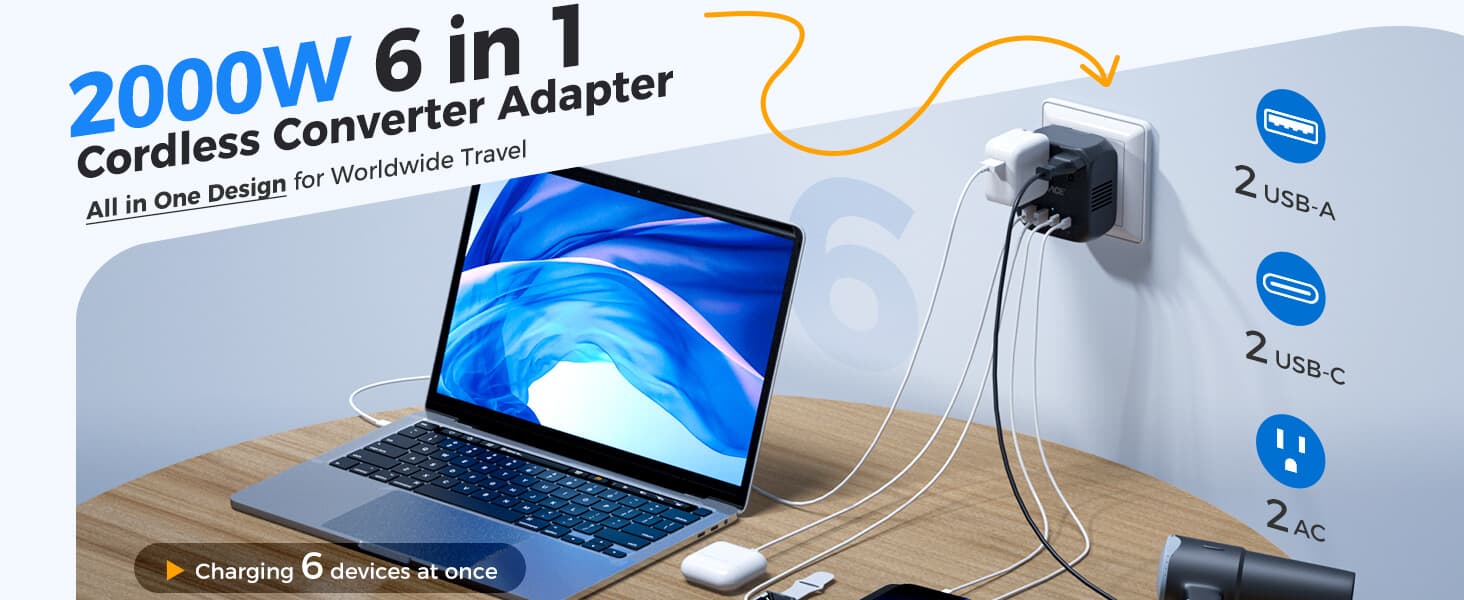
DOACE C15 2000W Voltage Converter
For mechanical hair dryers (up to 2000W), flat irons, and simple heating tools with manual switches. Not for Dyson Airwrap, smart curling irons with digital temperature control, or any device with a microprocessor.
Compare DOACE models side by side in the DOACE LC-C30 vs LC-X35 vs LC-X80 comparison guide.
FAQ
Does a travel adapter convert voltage?
No. A plug adapter changes plug shape only. If your device is 120V-only and the country uses 220-240V, you need a compatible voltage converter or a dual-voltage replacement device.
Is a grounded travel adapter always grounded?
No. Grounding depends on the wall outlet wiring, adapter design, and plug combination. A three-hole adapter does not automatically preserve a real earth path — most universal sliding adapters have no ground conductor.
Why did my travel adapter fuse blow?
Most likely: the device wattage exceeded the fuse rating, or you plugged a 120V device into 230V (doubling current). Less common: device fault or loose connection causing arcing. Diagnose the cause before replacing — never install a higher-rated fuse.
Can I use a travel adapter for a hair dryer?
Only if the hair dryer is dual-voltage (check the label for "120-240V") and within the adapter's wattage rating. A 120V-only hair dryer in a 230V country needs a high-watt converter like the DOACE C15. Many travelers find it easier to use the hotel's wall-mounted dryer.
Is it normal for a travel adapter to get warm?
Slight warmth (30-40°C) is normal under load. If it becomes too hot to hold comfortably (>55-60°C), or shows discoloration, smell, or buzzing, unplug immediately.
Can I plug a power strip into a travel adapter?
Only when the power strip is rated for the local voltage, the total device wattage is within the adapter's rating, and local rules allow it. Surge-protected power strips are banned on most cruise ships because their MOV components malfunction in the ship's IT electrical system.
What does 10A mean on a travel adapter?
10A is the maximum current under rated conditions. At 230V: 10A = 2300W theoretical max. At 120V: 10A = 1200W. For sustained use, stay at 70-80% of this maximum — so ~1600-1840W at 230V.
Can I stack two adapters (adapter into adapter)?
No. Each connection point adds contact resistance and wobble risk. Two stacked adapters = four extra contact points = significantly more heat and instability. Buy the correct single adapter for your destination.
Does my CPAP need a voltage converter?
Most modern CPAP machines (ResMed AirSense 10/11, Philips DreamStation 2) have 100-240V power supplies — check the label on the power brick. If confirmed wide-voltage, you only need a plug adapter. If the humidifier has a separate 120V heater, that component may need a converter.
What should I do if my adapter sparks?
Unplug immediately if safe to do so. A spark when inserting or removing can be normal (inrush current). Repeated sparking during use, or sparking accompanied by smell or heat, indicates a dangerous connection — stop using that adapter and outlet combination.
Disclaimer: This guide provides general safety information based on publicly available standards and product specifications. It does not replace advice from a licensed electrician. Always verify your specific device's requirements by reading its label. For medical devices, follow your manufacturer's travel guidance.


